
The account model
Three terms show up throughout the API. They nest:- Wallet — your Ethereum EOA (the address that owns everything). One wallet ↔ one account.
- Subaccount — the unit you actually trade from. It holds collateral and positions and is identified by a numeric
subaccount_id. A wallet can own many. - Manager — the margin/risk model a subaccount runs under: standard (cross) margin or portfolio margin. You pick a manager when the subaccount is created; it also fixes the subaccount’s risk universe.
A brand-new wallet’s first deposit creates two subaccounts: the funded one you asked for, plus a fallback
subaccount (under manager id
0) that catches any deposit that can’t be applied to its intended target. Expect two
ids to appear the first time — the fallback is normal.v3 has no
private/create_subaccount method — subaccounts are created on-chain by depositing. See the
changelog for the v2 → v3 method changes.Step 1 — Choose deposit params
When depositing to a new subaccount you must chose a risk universe / manager. Usepublic/get_risk_universes to list every
universe with its managers and their accepted collaterals / instruments.
See Managers & risk universes for how to choose.
What each asset field means
Step 2 — Deposit
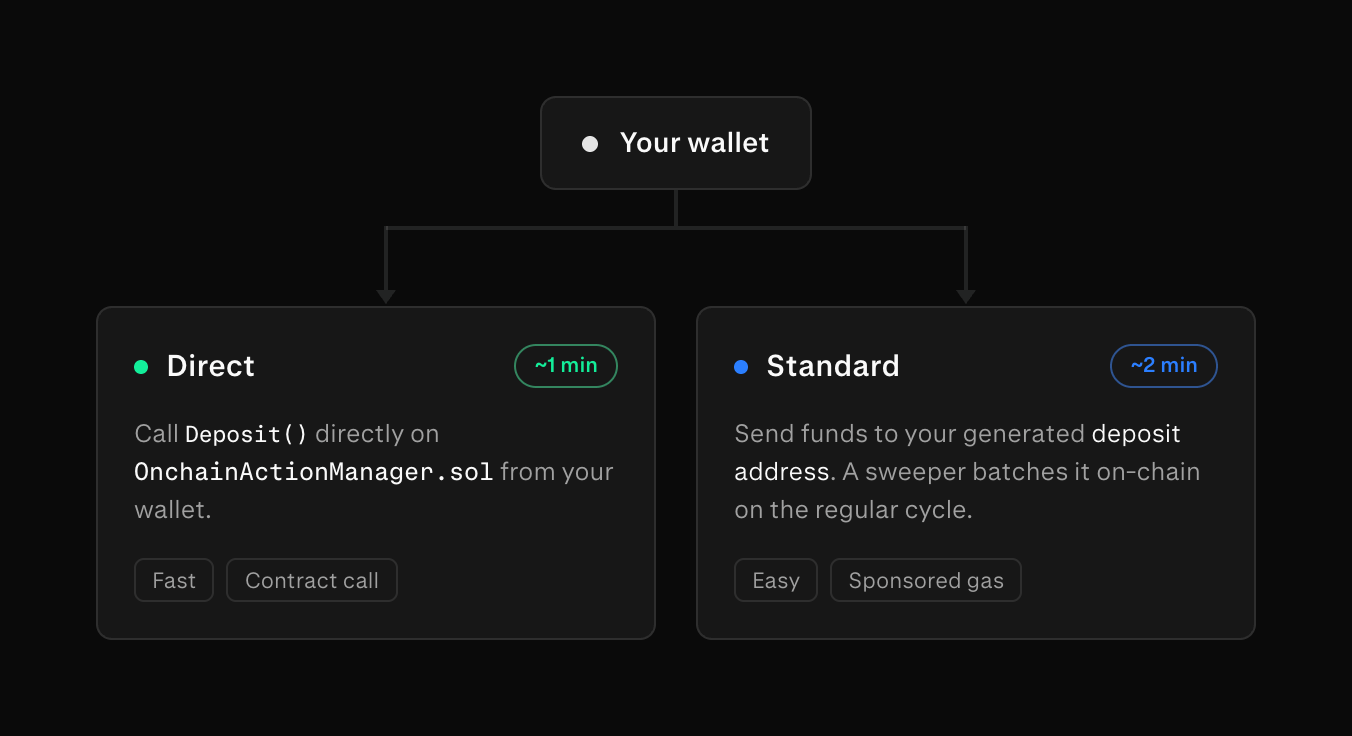
You can deposit 2 different ways - each ideal for different types of users:- Direct: call the
Deposit()orDepositNewSubaccount()calls on theOnchainActionManager.sol. (~2 min) - Standard: less integration work as simply requires user to send funds to a custom ETH address from where a keeper will auto deposit funds into the exchange. (~2 min)
On testnet, every token is mintable: open testnet.app.derive.xyz, connect your
wallet, and click Deposit in the top right, then Mint a token of your choice.
- Direct
- Standard
Your own wallet calls the settlement contract (
ACTION_MANAGER, address per Contracts). First
approve the contract to pull your ERC-20, then call one of:depositToNewSubaccount(asset, amount, managerId, owner)— create a new subaccount undermanagerId, owned byowner.deposit(asset, amount, subaccountId, fallbackRecipient)— fund an existingsubaccountId;fallbackRecipientreceives the funds into its fallback subaccount if the deposit cannot be applied.
Mainnet and testnet have different
ACTION_MANAGER addresses. Take the one for your network from
Contracts.Step 3 — Confirm the deposit was credited
A mined deposit transaction is not the end of the story: the exchange credits the funds asynchronously, and the newsubaccount_id is not carried in the transaction receipt. Two endpoints cover the gap.
First feedback — public/get_pending_deposits
Whichever method you used, an entry appears here the moment the exchange picks the deposit up: Direct and
Standard deposits as soon as the action lands in the OnchainActionManager (for Standard, when the keeper sweeps
the deposit address). It is a public call, so it works before your account exists.
Direct / Standard deposits sit here (pending → confirmed) while the exchange waits roughly two minutes
of confirmations before including them in state — once your entry shows up, switch to polling
private/get_subaccounts below.
Crediting — private/get_subaccounts
Discover a new subaccount by snapshotting your subaccount ids before depositing and polling
private/get_subaccounts afterward for the id that appears — the SDK’s client.deposits.awaitNewSubaccount does this.
For a deposit into an existing subaccount, poll private/get_subaccount and watch its collateral balance increase.
public/get_onchain_action_history. It lists each OnchainActionManager action the sequencer
scraped and its status — applied (with an op_uuid), consumed as a fallback no-op, or still retrying.
private/get_deposit_history, scoped to the
whole wallet or a single subaccount_id. Amounts and fee are decimal strings; the net credited amount is
amount - fee.
private/get_subaccounts and private/get_deposit_history are private methods — authenticate the connection with
session login first. Once a subaccount is funded, you can log in and start trading.Depositing from another chain
Derive v3 settles as a ZK rollup, but its deposit contracts live on Ethereum L1. Whatever chain your funds start on, they must arrive at L1 before the exchange can credit them. The Derive front-end uses Li.Fi for bridging deposits. However, you may choose any bridge you prefer. Bridge to the deposit address from Step 2 and the deposit proceeds exactly as described above, with no extra integration.Some collaterals, such as HYPE and SOL, have no native Ethereum token. They bridge through Derive’s own
LayerZero bridges — see Custom Bridges for the bridge addresses.
Next steps
Quickstart
Now that your subaccount is funded, log in, sign an order, and stream your fills.
Authentication
Session login and the per-action signing model.
Transfers & Withdrawals
Move collateral between subaccounts and back on-chain.