
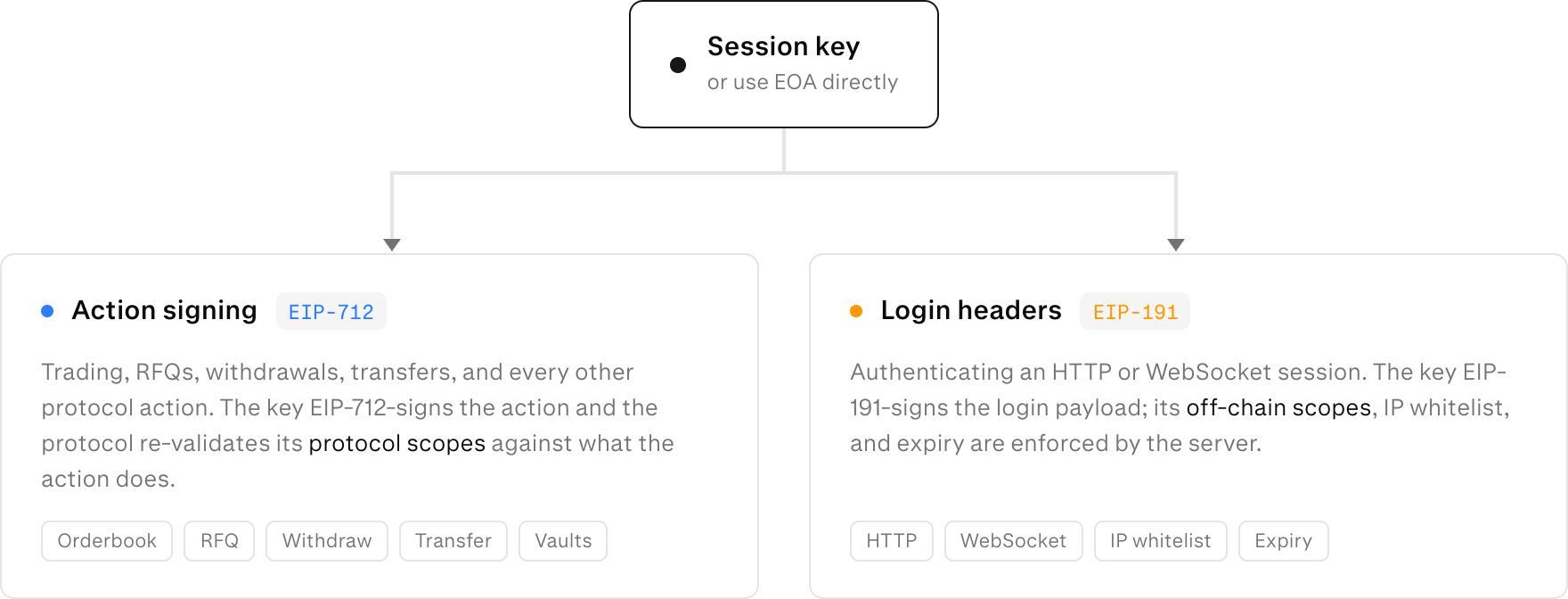
- Protocol scopes — on-chain authority (trade, transfer, withdraw, …). Signed into each action and re-validated by the protocol.
- Off-chain scopes — server-side capabilities (
account_info). Never signed; enforced by the server.
How session keys are used
Delegated attenuation
The key you create can never exceed the authority of the key that signs the creation action. A child key’s scopes, expiry, and subaccounts must each be a subset of its parent’s. A key withoutadmin cannot mint an admin child; a key expiring next week cannot mint a child expiring next month. The protocol enforces this when the create action is applied.
The signing parent must itself hold the set_session_key protocol scope.
Create a session key
- API -> call
private/set_session_keywith the owner or any session key with stronger scopes. - Onchain -> see Smart Contract & Multi-sig Accounts.
IP whitelist
If a key’s whitelist is non-empty, login from any other IP is rejected. An empty whitelist imposes no IP restriction. Adding or removing IP Whitelists requires the owner or an admin-scoped key.Editing a session key
- Protocol Scopes: call the same
private/set_session_keyendpoint or onchainSet Session Key(see Smart Contract & Multi-sig Accounts) action again for the session key you want to modify. - Offchain Scopes and metadata: call
private/edit_session_keyto update the label, IP whitelist, or off-chain scopes. This does not require a signed action. IP whitelist or off-chain scopes requires protocoladminscope or the owner.
Lifecycle at a glance
1
Create
Wallet (or a parent key with
set_session_key scope) signs a create
action granting a subset of its own scopes, expiry, and subaccounts.Can be done both through API via private/set_session_key or on-chain
via the Set Session Key action (see Smart Contract & Multi-sig Accounts).2
Authenticate
The session key logs in via EIP-191 session
login; its IP whitelist and expiry are
enforced at this step.
3
Sign actions
The key EIP-712-signs each action; the protocol re-checks that the key’s
scopes cover the action (see Action
signing).
4
Edit metadata
Adjust label, IP whitelist, or off-chain scopes with
edit_session_key.
Protocol scopes require a fresh set_session_key.5
Expire
The key stops working once
expiry_sec passes. You can “revoke” session keys by bringing the expiry closer to now.
However, there is a minimum cooldown of 5-15min.Related
Access scopes
The full protocol and off-chain scope catalog and per-route gating.
Action signing
How the create action (and every trading action) is signed with EIP-712.
Smart Contract & Multi-sig Accounts
Authorize a session key from L1 when the account owner is a contract or multi-sig.